
The Egofit Walker Pro M1 and ComfortDeck M2 are both compact incline walking pads designed around standing-desk use.
But they prioritize different things.
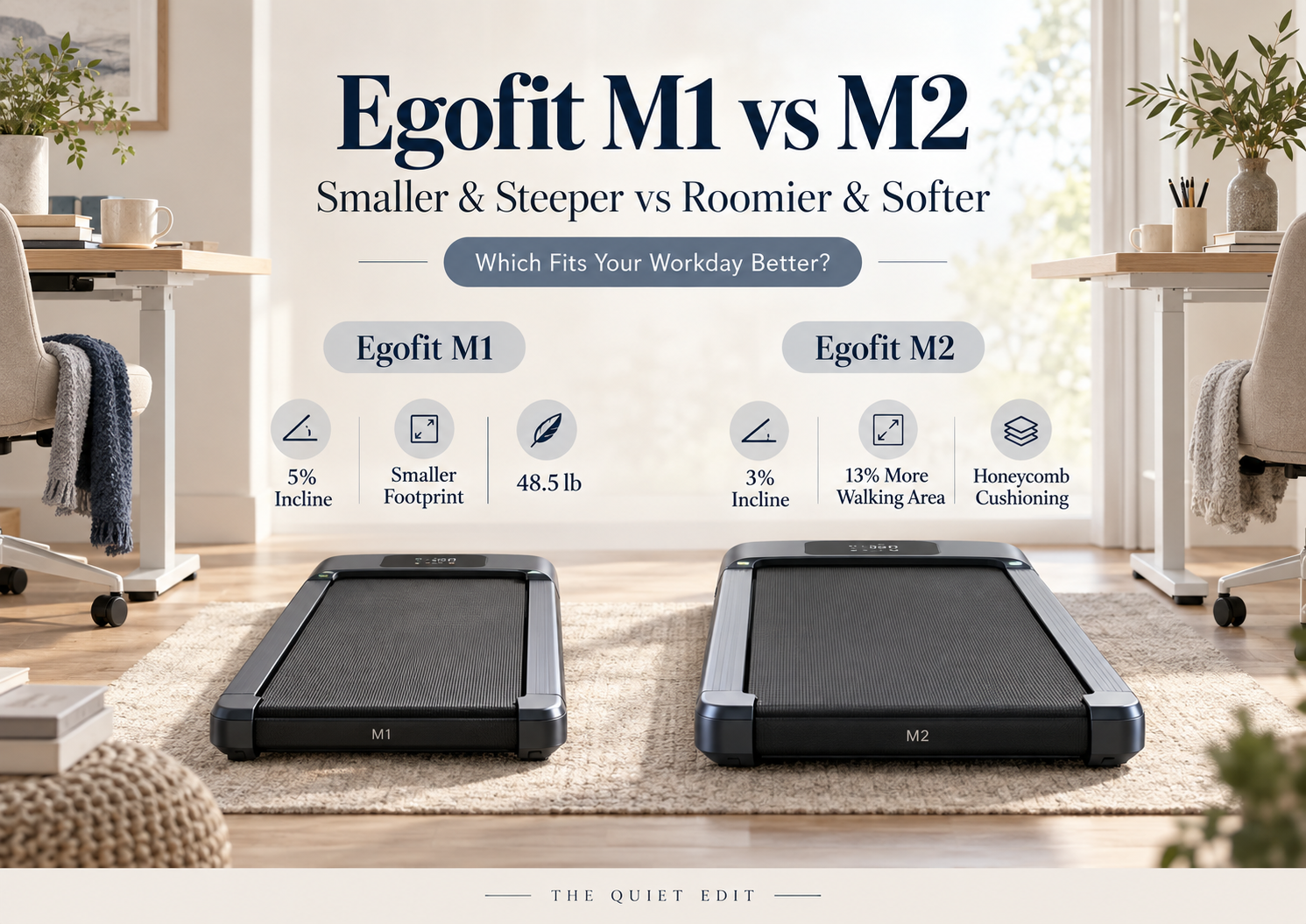
The M1 is the smaller machine and uses a steeper 5% fixed incline. The M2 is slightly larger, uses a gentler 3% incline, and adds Egofit’s Honeycomb ComfortDeck cushioning system along with a wider and longer walking area.
So this isn’t simply a case of the M2 being the newer or more expensive version.
Quick answer: Choose the Egofit M1 if your priorities are compact dimensions, a steeper fixed incline, and easier daily storage. Choose the Egofit M2 if you’d rather have more walking space, higher published weight capacity, and a cushioning-focused deck for longer workday walking sessions.
Disclosure: This article contains affiliate links. If you purchase through these links, we may earn a commission at no additional cost to you. As an Amazon Associate I earn from qualifying purchases.
How we compared them: We have not personally tested either treadmill. This comparison is based on current Egofit specifications, product documentation, manufacturer descriptions, and original calculations derived from those published dimensions. Prices and availability can change.
Egofit M1 vs M2 at a Glance
| Egofit M1 | Egofit M2 | |
|---|---|---|
| Best for | Compact spaces / steeper incline | Comfort / more walking room |
| Incline | 5% fixed | 3% fixed |
| Walking area | 34.25 × 16.54 in | 36.2 × 17.7 in |
| Overall dimensions | 38.39 × 21.85 × 6.89 in | 41.5 × 22.8 × 7 in |
| Weight | 48.5 lb | 51.36 lb |
| Weight capacity | 220 lb | 245 lb |
| Motor | 2.0 HP | 2.5 HP |
| Top speed | 3.11 mph | 3.1 mph |
| Cushioning | Standard deck | Honeycomb ComfortDeck |
| Transport wheels | Yes | Yes |
| App / controls | App + remote | Desktop console / controls |
Egofit’s official product pages list these current specifications.
The M1 Is Better If Space Is Tight
The biggest advantage of the Egofit M1 is its size.
It measures just:
38.39 × 21.85 × 6.89 inches
compared with:
41.5 × 22.8 × 7 inches
for the M2.
That means the M2 is about:
- 3.1 inches longer
- 0.95 inches wider
- roughly the same height
Using the published length and width, we calculated the approximate floor footprint:
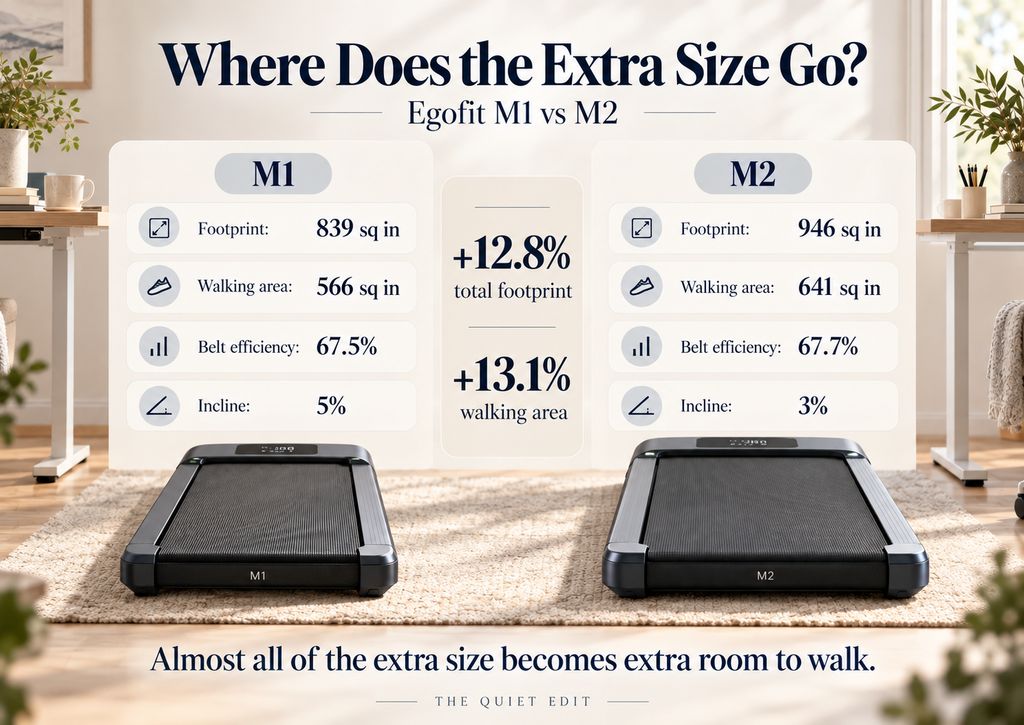
- M1: 839 sq in
- M2: 946 sq in
So the M2 occupies roughly 12.8% more floor area.
That’s not an enormous difference in a large home office.
In a small bedroom or apartment, though, 13% more floor footprint is noticeable when you’re trying to slide the machine beside furniture or under a desk.
Small-space winner: Egofit M1
If floor space is your main concern, see our guide to the best walking pads for small apartments.
The M1 Also Has the Steeper Incline
The M1 uses a fixed 5% incline.
The M2 uses a fixed 3% incline.
Neither model lets you change incline electronically during the workout.
So the difference is not flexibility.
It’s simply how steep the machine feels every time you use it.
Egofit itself positions the M1 as the more intensity-focused model and the M2 as the gentler, comfort-oriented alternative.
That makes the decision fairly simple.
Choose the M1 if you deliberately want more incline during normal desk walking.
Choose the M2 if you’d rather have a milder slope for longer, easier sessions.
Incline winner: Egofit M1
Want to compare more incline-focused options? See our guide to the best walking pads with incline.
The M2 Gives You More Walking Space
This is probably the M2’s most useful physical advantage.
Its walking area measures:
36.2 × 17.7 inches
compared with:
34.25 × 16.54 inches
on the M1.
That gives the M2:
- about 1.95 inches more belt length
- about 1.16 inches more belt width
Using those dimensions, the total walking area is approximately:
- M1: 566.5 sq in
- M2: 640.7 sq in
That’s roughly 13.1% more usable walking surface on the M2.
The extra width may be especially useful while working.
When you’re looking at a monitor rather than watching your feet, more side-to-side margin can make a compact treadmill feel less restrictive.
Egofit also says the M2 supports users up to 6’3″ / 1.9 m, although that is the manufacturer’s guidance rather than an independently tested comfort limit.
Walking-space winner: Egofit M2
If stride room matters most, see our guide to the best walking pads for tall users.
Where Does the M2’s Extra Size Actually Go?
This is the part that makes the comparison more interesting.
The M2’s overall footprint is about 12.8% larger than the M1’s.
Its usable walking area is about 13.1% larger.
In other words, almost all of that extra physical size is being translated into a larger belt rather than wasted on a bulky outer housing.
We can also calculate how much of each machine’s footprint is usable walking area.
M1
566.5 sq in walking area ÷ 838.8 sq in overall footprint
= approximately 67.5%
M2
640.7 sq in walking area ÷ 946.2 sq in overall footprint
= approximately 67.7%
That’s basically identical.
So the practical takeaway is:
The M1 is genuinely more compact. The M2 is larger because it gives you proportionally more room to walk.
Neither design is obviously less space-efficient.
They’re simply targeting different users.
This would be the perfect spot for the article’s comparison graphic later.
The M2 Is More Cushioning-Focused
The biggest feature difference that isn’t visible in basic dimensions is the Honeycomb ComfortDeck.
Egofit says the M2 uses a multi-zone cushioning system designed to reduce impact, with different cushioning characteristics across the deck. The company describes the system as using variable-durometer elastomers and a composite deck structure.
We haven’t independently tested how much softer or more comfortable that feels compared with the M1.
So we would not say:
The M2 is definitely better for your knees.
What we can say is:
The M2 includes a dedicated cushioning system that the M1 does not advertise as a comparable feature.
That makes the M2 the more logical choice if comfort during long walking sessions is one of your main buying criteria.
Cushioning winner: Egofit M2
The M2 Supports More Weight
Egofit publishes:
- M1: 220 lb maximum user weight
- M2: 245 lb maximum user weight
So the M2 gives you an additional 25 pounds of published capacity.
That’s useful, but it shouldn’t be confused with walking-space comfort.
A higher capacity does not automatically mean the belt is right for a particular body size or stride.
In this case, the M2 happens to give you both:
- higher published capacity
- larger walking area
but those are separate specifications.
Capacity winner: Egofit M2
The M1 Is Slightly Easier to Move
The M1 weighs 48.5 pounds.
The M2 weighs 51.36 pounds.
That’s only about 2.9 pounds, or roughly 6%, heavier for the M2.
Both have transport wheels.
So on a flat floor, this probably isn’t a dramatic difference.
But if you’re repeatedly rotating the treadmill, pulling it away from furniture, or moving it between rooms, the M1’s combination of:
- lower weight
- shorter body
- narrower frame
should make it the less cumbersome machine on paper.
Daily portability winner: Egofit M1
Speed Is Basically a Tie
There’s almost nothing separating them here.
The M1 has a published range of:
0.62–3.11 mph
The M2:
0.62–3.1 mph.
For practical purposes, that’s the same maximum speed.
Neither is intended to replace a running treadmill.
They’re walking-focused machines built primarily around under-desk use.
So speed shouldn’t be a deciding factor between these two.
Speed: Tie
What About Motor Power?
The M1 uses a 2.0 HP motor.
The M2 is listed with a 2.5 HP motor.
That sounds like an obvious M2 advantage.
But the M2 doesn’t use that extra published motor rating to provide a higher top speed.
Both top out at roughly 3.1 mph.
The more practical differences are therefore still:
- M2’s higher user capacity
- larger walking area
- cushioning system
rather than raw motor horsepower alone.
We wouldn’t choose between them based purely on the HP number.
Which One Is Quieter?
We don’t have enough comparable evidence to declare a winner.
Egofit publishes an under-70 dB claim for the M1 at maximum speed.
The M2 is described as quiet and its Honeycomb deck is marketed partly around impact and noise reduction, but its current product page doesn’t give us a directly comparable standardized dB measurement.
So comparing the two numerically would be misleading.
Real-world sound will also depend on:
- walking speed
- user weight
- footwear
- flooring
- foot strike
- use of a treadmill mat
Noise winner: No call
Under-Desk Use: M1 or M2?
Both are clearly built around standing-desk walking.
But they suit slightly different work routines.
Choose M1 for:
- a smaller office
- tighter floor space
- frequent moving or storage
- steeper everyday incline
- simpler under-desk walking
Choose M2 for:
- longer walking sessions
- more belt width
- more stride room
- higher published capacity
- cushioning as a priority
The M1 feels more like a compact productivity tool.
The M2 feels more like a comfort-focused walking platform that still fits under a desk.
Building a walking workstation? See our guide to the best walking pads for under a desk.
What Does the Extra Size Buy You?
Here’s the TQE version of the comparison.
Moving from the M1 to the M2 adds approximately:
- +12.8% floor footprint
- +13.1% walking area
- +1.95 in belt length
- +1.16 in belt width
- +2.86 lb machine weight
- +25 lb published capacity
- dedicated Honeycomb cushioning
What do you lose?
- 5% incline becomes 3%
- the machine takes up more space
What doesn’t meaningfully change?
- top speed
- basic under-desk role
- transport-wheel portability
That’s the real trade.
The M2 doesn’t simply add more features. It trades some compactness and incline intensity for more walking room and comfort-focused design.
Price Is Messy Right Now
One unusual part of this comparison is Egofit’s own pricing display.
As of September 28, 2026, the individual US product pages show:
- M1: $399
- M2: $499
with Add to cart controls.
But Egofit’s product comparison page shows lower From $299 / From $359 pricing while also displaying Sold Out labels in places.
Because those pages are not fully consistent, we wouldn’t base the recommendation on a fixed $100 difference.
Use:
for both and verify the live checkout price when publishing.
Who Should Buy the Egofit M1?
Choose the Egofit M1 if:
- your room is genuinely tight
- you want the steeper 5% incline
- you move the treadmill regularly
- a 34.25 × 16.54-inch belt is enough for you
- 220-pound published capacity meets your requirements
- compactness matters more than advanced cushioning
The M1’s biggest strength is that it stays unusually short while still giving you fixed incline.
For apartment offices and compact standing-desk setups, that’s a useful combination.
Prefer the M1 but wondering whether a handrail is worth adding? See our Egofit M1 vs M1T comparison.
Who Should Buy the Egofit M2?
Choose the Egofit M2 if:
- you want more walking room
- you prefer a wider belt
- dedicated cushioning matters
- you plan longer walking sessions
- you need up to 245 pounds of published capacity
- a 3% incline is enough
- the slightly larger frame isn’t a problem
The M2 is the more comfort-oriented choice rather than simply the “higher model number.”
Egofit M1 vs M2: Our Verdict
For a small home office, we’d lean toward the Egofit M1.
Its footprint is about 13% smaller, it weighs slightly less, and its 5% fixed incline gives it a surprisingly workout-focused character despite its compact dimensions.
For longer daily walking sessions, we’d lean toward the Egofit M2.
You get approximately 13% more walking area, a wider belt, 25 pounds more published capacity, and the Honeycomb ComfortDeck system.
So the choice isn’t really:
Which Egofit is better?
It’s:
Do you want less machine, or more walking surface?
M1 = smaller + steeper
M2 = roomier + more comfort-focused
That’s the distinction that matters.
Frequently Asked Questions
Is the Egofit M2 better than the M1?
Not universally. The M2 gives you more walking area, higher published capacity, and dedicated Honeycomb cushioning. The M1 is smaller, lighter, and uses a steeper 5% fixed incline.
What is the main difference between Egofit M1 and M2?
The M1 prioritizes compactness and a 5% incline. The M2 is larger, has a 3% incline, a wider and longer belt, and Egofit’s ComfortDeck cushioning system.
Which Egofit is better for small spaces?
The M1. Based on the published dimensions, its floor footprint is approximately 12.8% smaller than the M2’s.
Which has the larger walking area?
The M2. Its 36.2 × 17.7-inch walking surface works out to roughly 13% more total walking area than the M1’s 34.25 × 16.54-inch surface.
Which Egofit has more incline?
The M1 uses a 5% fixed incline, while the M2 uses 3%.
Can you run on the Egofit M1 or M2?
These models are primarily designed for walking and top out at roughly 3.1 mph, so we would treat them as walking-focused machines rather than running treadmills.